Inside the Practice Pack: How to Use All 7 Files
Includes a 24-second mix, matched 8-second mix/drum excerpts, worksheet PDF, waveform PNG, notes and guide from our “Hitman” demo. No payment needed.
The Single-song Practice Pack turns your separation result into files you can take to a practice room: a custom backing mix, two matched audio excerpts, a printable worksheet, a waveform map, your notes and a guide. The current price is $4.90 for one saved song task. You can listen to your mix and prepare the files before checkout.
This walkthrough uses the freely downloadable Hitman practice demo. Unzip it and follow along—no purchase or audio upload is needed. Its seven files have the same structure as a pack you prepare from your own song.
Your original free drumless and drums-only WAV downloads remain available. The paid pack adds editing and organization around those same separation results; buying it does not switch to a stronger AI model.
Start with the demo settings
The source is the 24-second Hitman clip used on this site, not the complete original song. The pack uses these controls:
| Setting | Demo value |
|---|---|
| Drums | Muted in the custom mix |
| Bass | 80% |
| Other instruments | 100% |
| Vocals | 65% |
| A / start | 16.000 seconds |
| B / end | 24.000 seconds |
| Excerpt duration | 8.000 seconds |
| Playback speed | Original speed |
These percentages are mix-control positions, not measurements of separation quality or perceived loudness. The export leaves headroom to reduce clipping, so do not expect its volume to match the original recording exactly.
You will see filenames beginning with Hitman-practice-demo-. A pack from your own task uses a filename-safe version of the title you enter.
| File ending | What to use it for |
|---|---|
-mix.wav | Play the complete custom backing mix |
-excerpt.wav | Repeat the selected phrase without finding it again |
-drums-reference.wav | Hear the separated drum part for that same phrase |
-practice-sheet.pdf | Print your settings, notes and practice log |
-waveform.png | Locate the phrase within the full track |
-notes.txt | Keep and edit your practice notes |
README.txt | Check the export settings and file instructions |
1. The custom mix WAV: practise in context
Demo file: Hitman-practice-demo-mix.wav
Open this file in an audio player, or import it into your DAW. It contains the full 24-second demo clip, with drums muted and the other tracks at the levels listed above. Play your own drum part over it, or listen to how the bass and other instruments support the phrase you want to practise.
For your own pack, this file covers the full song you processed within the workspace limit. The mix follows your track volumes, mute choices and solo choices. It does not automatically remove drums if you choose to include them. To make a drumless backing track, keep Drums muted; if you solo a track, check the preview to make sure you are hearing the combination you intended.
Use the full mix before and after focused practice. The first listen gives you context. Returning to it afterwards helps you practise entering and leaving the phrase, instead of learning only an isolated loop.
All three WAVs in the pack use 44.1 kHz, stereo, 16-bit PCM at original speed. There is no slow-speed WAV in this pack, and changing a player’s speed is a separate playback feature.
2. The mix excerpt WAV: focus on one phrase
Demo file: Hitman-practice-demo-excerpt.wav
This file contains source seconds 16–24: the last eight seconds of the demo. When you open the excerpt on its own, your player starts at 0:00. That point corresponds to 16 seconds in the full mix.
Turn on repeat in your player to practise the phrase several times. In a DAW, put the excerpt on a track and set a loop region to its length. Loop behavior depends on the player; the file itself is a single eight-second excerpt, not several repetitions joined together.
To compare it with the full mix in a DAW, place the excerpt at 16 seconds, using a seconds-based timeline. Disable automatic stretching or tempo matching if your DAW applies it on import. The exported files are not trimmed to detected bars and do not include a beat grid.
The full mix and its excerpt use the same mix normalization. Short fades at file edges help reduce abrupt boundary clicks, but they cannot make an arbitrary musical cut into a seamless groove. If the repeat feels awkward, adjust A and B in the workbench, preview again and re-export that saved task.
3. The drum-reference WAV: listen, then answer
Demo file: Hitman-practice-demo-drums-reference.wav
This is the drums-only version of exactly the same 16–24 second interval. It is eight seconds long, just like the mix excerpt. Both files start at the same source sample and end at the same source sample.
Try this sequence:
- Listen to the drum reference once without playing.
- Repeat it while following the rhythm quietly with your hands or sticks.
- Switch to the mix excerpt and play the phrase yourself.
- If a particular moment is unclear, return to the reference before trying again.
The reference ignores your mix’s drum volume, mute and solo controls. In this demo, Drums is muted in the backing mix, but the reference still contains the drum stem. That lets you alternate between the part you are studying and the accompaniment you want to play over.
You can place both excerpts at 0:00 on separate DAW tracks and switch between them. If you place either beside the full mix, align it at source time 16 seconds instead. Their time alignment matches; their loudness may differ because the reference is a separate drums-only export.
This file is audio, not a drum transcription. Separation can leave bleed or artifacts, and the reference does not identify individual kick, snare or cymbal hits. The original full drums-only download is still free; the pack provides the matched crop and accompanying practice materials.
4. The practice-sheet PDF: take the setup away from the screen
Demo file: Hitman-practice-demo-practice-sheet.pdf
The demo PDF has two A4 pages. Open it in a PDF reader and use its print preview before printing. Choose “Fit” if your printer’s margins would otherwise cut into the page.
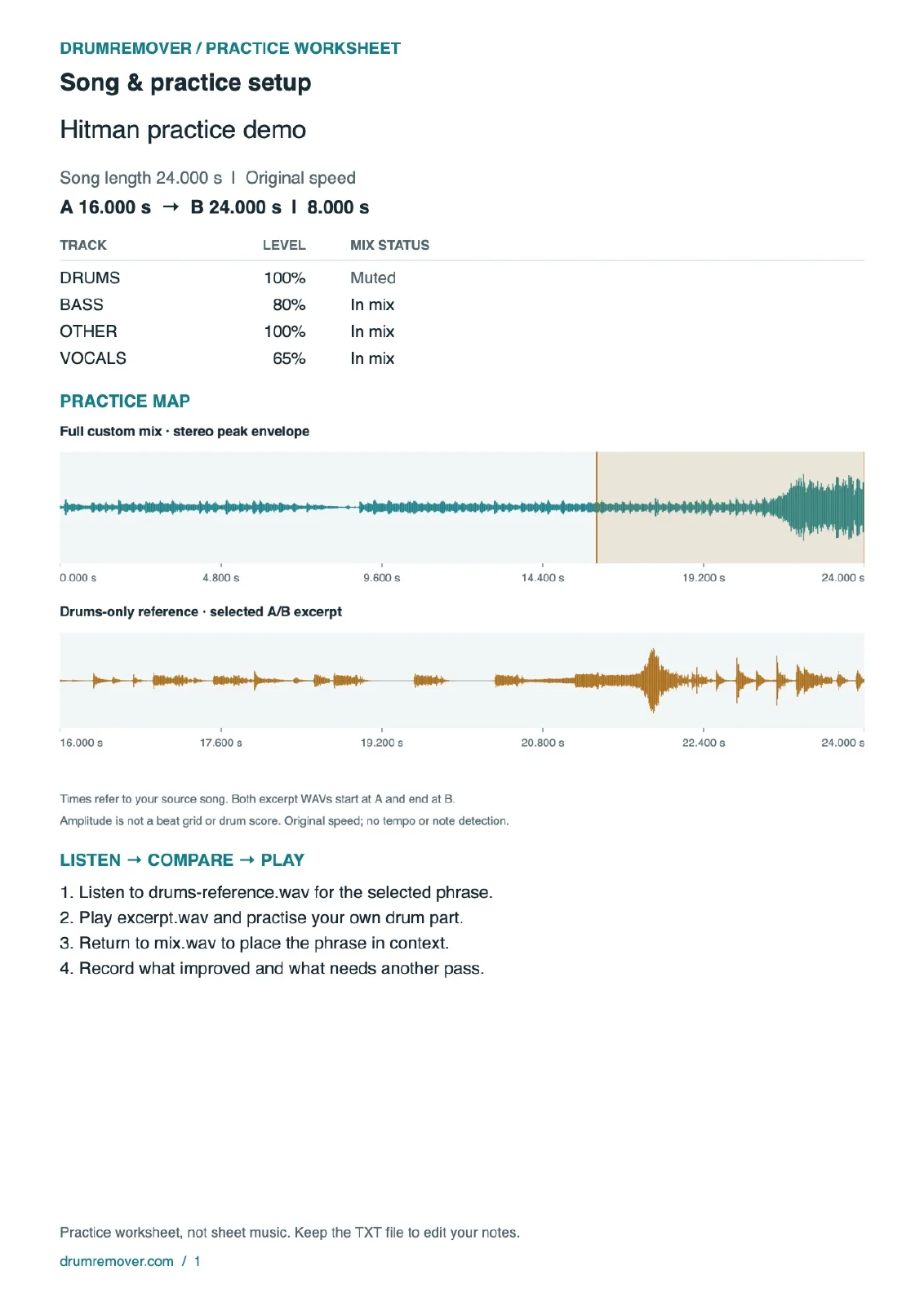
Page one records the song title, source duration, A/B times, track levels and mix states. Its waveform overview shows where the selected phrase sits in the song, followed by a short listening routine.
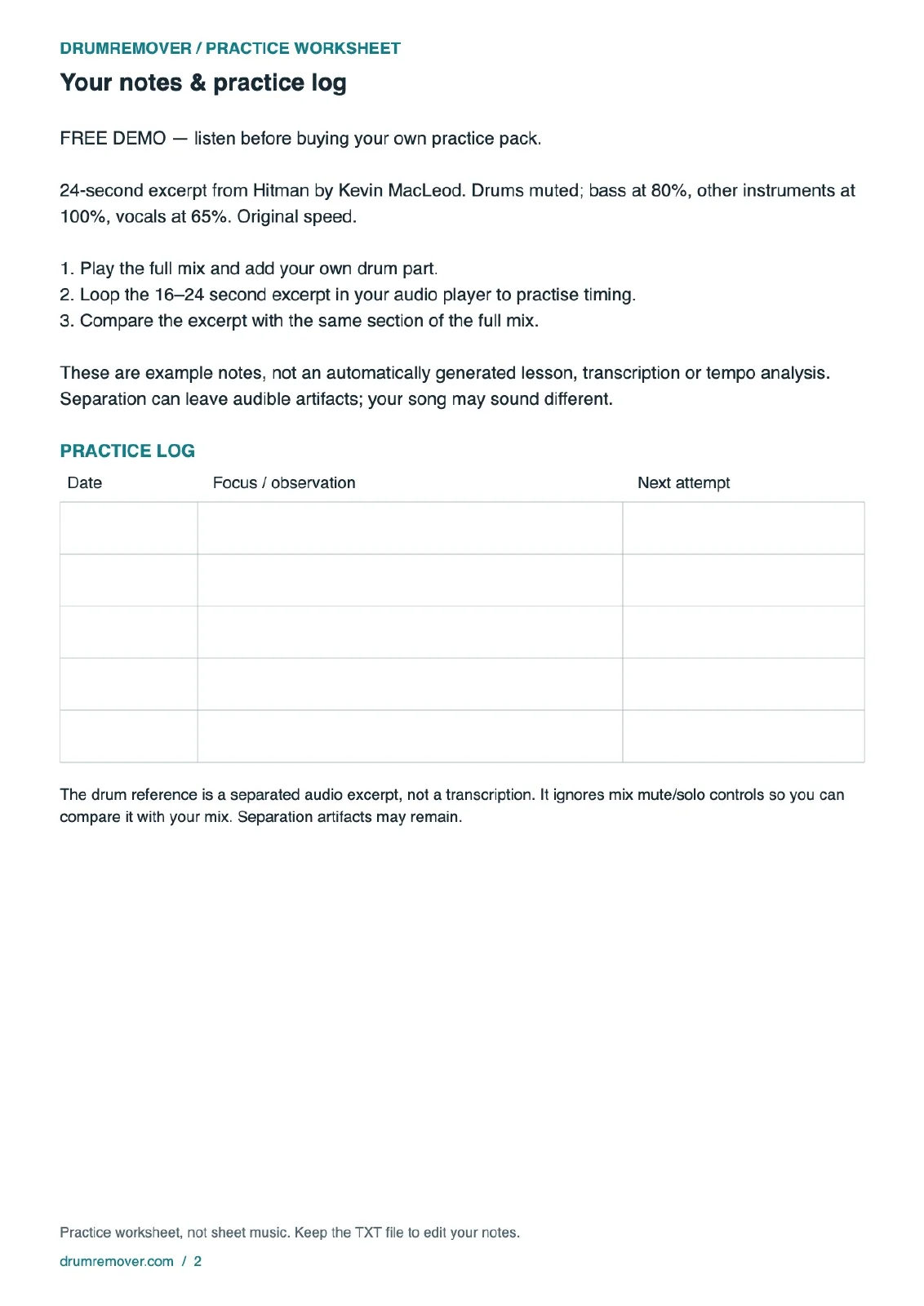
Page two contains the notes entered before export and a blank practice log. Use its Date, Focus / observation and Next attempt columns to record something specific—for example, “Enter the phrase without rushing,” followed by what you will listen for on the next attempt. These are your observations; DrumRemover does not assess your performance.
This PDF is a practice worksheet, not sheet music. It does not contain automatically recognized notes, drum notation or fingering. Its pages are rendered for printing; use the TXT file when you want editable text. Longer notes may produce more pages. If they exceed the worksheet’s 180-line print limit, the PDF says so and the complete notes remain in the TXT file.
5. The waveform PNG: keep your place
Demo file: Hitman-practice-demo-waveform.png
Open the PNG in an image viewer, keep it beside your player or add it to your practice notebook. It gives you a quick visual reference without reopening the workbench.
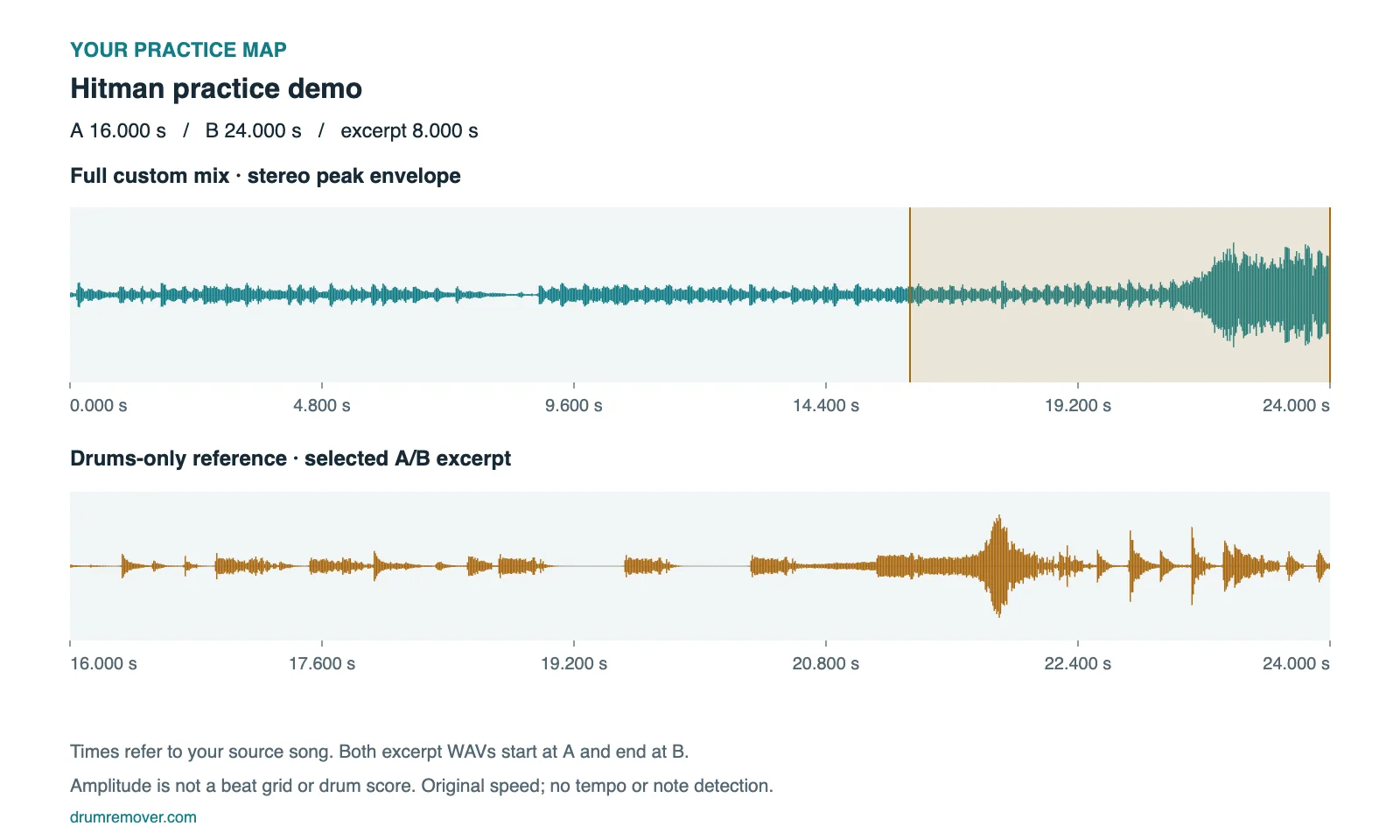
The upper plot covers the full custom mix, from 0 to 24 seconds. The shaded selection marks A = 16 through B = 24. The lower plot expands the drums-only reference for that interval. Its labels still show source times 16–24, even though the standalone excerpt starts at 0:00 in your player.
The vertical shape shows a stereo peak envelope: a compact picture of audio amplitude. Peaks can help you locate an audible event, but they are not note labels or reliable beat markers. Do not count every visible spike as a drum hit, or treat the evenly spaced time labels as beats. The map does not estimate BPM, time signature or song sections.
6. The notes TXT: keep a working notebook
Demo file: Hitman-practice-demo-notes.txt
Open this in any plain-text editor. It contains the title and notes entered for the task. The demo notes describe the mix and suggest playing the full clip, practising the 16–24 second excerpt and comparing it with the same section in context.
For your own song, useful notes might be a practice goal, a difficult transition or a reminder about how you set the mix. After downloading, you can add observations directly to the TXT file without opening DrumRemover.
Editing the downloaded TXT does not update the saved browser task or its PDF. To put revised notes into a new worksheet, restore the task, edit the notes in the workbench, choose Prepare & verify files, then verify your purchase and download the new files. Keep the task on the same device while doing this.
7. README.txt: preserve the instructions with the audio
Demo file: README.txt
Read this first if you return to the folder later and cannot remember what you exported. It records the source duration, A/B selection, audio format and mix controls, then explains the worksheet, waveform and drum reference.
The demo README also includes the music credit and license: Hitman by Kevin MacLeod, with the source and attribution details. The demo is a modified 24-second clip, not the complete original recording, and does not imply the artist endorses DrumRemover.
Keep the README beside the other files when you back up the folder. A purchase does not give you copyright or distribution rights in a song you upload; permissions for that recording remain separate from the tool’s export service.
Put the seven files into one practice routine
You do not need to open every file for every session. For the demo, a simple routine is:
- Play
-mix.wavonce to hear the 24-second context. - Use the waveform or worksheet to locate the 16–24 second phrase.
- Listen to
-drums-reference.wav, then switch to-excerpt.wavand play your own part. - Repeat the phrase as needed, then return to the full mix and practise the transition.
- Write one observation and one next action on the worksheet or in the TXT file.
That is the purpose of the pack: spend less time cutting audio, recreating settings and finding the same passage again.
Prepare a pack from your own song
Open DrumRemover, separate your audio, then open the practice workspace from the results. Set the mix, choose A and B, add a title and notes, and listen before preparing the files. Prepare & verify files generates the full pack locally and checks that it can be saved and read back before checkout is enabled.
The workspace currently accepts audio up to four minutes and 64 MiB. Paid checkout is available on desktop browsers; Mobile Safari has not been validated for paid packs. The original free tools remain available.
The $4.90 purchase covers the same retained task, including later changes to its mix, excerpt, title and notes. A different song or a newly created task is separate. Earlier purchases can prepare the added worksheet, waveform and drum reference for their existing retained task without buying again.
After payment is verified, download the ZIP and keep a backup. Individual files are also available if ZIP packing fails. Browser tasks may remain for up to seven days, but browser cleanup, private browsing or device changes can remove them sooner. Payment records cannot reconstruct cleared local audio, and there is no automatic cross-device recovery. If payment appears successful but a download fails, use Verify purchase / retry before paying again; see the practice pack terms and recovery information.
Try the files before deciding: Download the free Hitman practice demo ZIP. The same seven file types are included in your own prepared pack, with your audio and settings.